

 حذف

- بررسی تخصصی
- نظرات کاربران
Linksys32X
اکسس پوینت
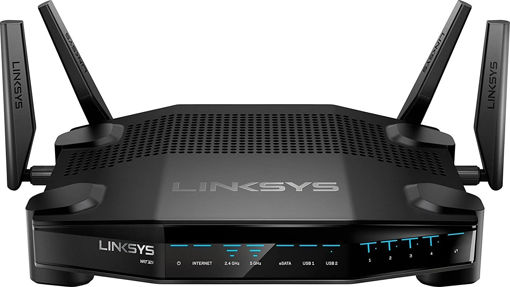
Power indicator (1)—The power light is solid blue while the router is powered on. It will blink when the router goes through its self-diagnostic mode during start up. Internet Indicator
(2)—The INTERNET light is solid blue when connected to the internet. It blinks while the router works to establish a connection. A solid orange light means the connection is down due to configuration issues. Blinking orange means the connection is down due to hardware issues. 4 2.4 GHz Indicator
(.......
Linksys32X
اکسس پوینت
Power indicator (1)—The power light is solid blue while the router is powered on. It will blink when the router goes through its self-diagnostic mode during start up. Internet Indicator
(2)—The INTERNET light is solid blue when connected to the internet. It blinks while the router works to establish a connection. A solid orange light means the connection is down due to configuration issues. Blinking orange means the connection is down due to hardware issues. 4 2.4 GHz Indicator
(3)—The light is solid blue when one or more clients are connected to the 2.4 GHz network. The light blinks when the router is sending or receiving data over the 2.4 GHz network. 5 GHz Indicator
(4)—The light is solid blue when one or more clients are connected to the 5GHz network. The light blinks when the router is sending or receiving data over the 5 GHz network. eSATA Indicator
(5)—If the light is off, the USB/eSATA port is off or a USB device is connected. The light is solid blue when an eSATA device is connected. The light blinks to indicate activity through the eSATA port. USB1 Indicator
(6)—If the light is off, the USB /eSATA port is off or an eSATA device is connected. The light is solid blue when a USB device is connected. The light blinks to indicate activity on the port. USB2 Indicator
(7)—The light is solid blue when a USB device is connected. The light blinks to indicate activity on the port. ETHERNET 1 through 4 (Primary)
(8)—These numbered lights correspond with the numbered ports on the router’s back panel. If the light is solid blue, the router is connected to a device through that port. The light blinks to indicate network activity over that port. ETHERNET 1 through 4 (Secondary)
(9)—If the light is off, the router is connected to a device through that port at 10/100 Mbps. A solid blue light means the router isconnected to a device at 1000 Mbps. WPS Indicator
(10)—The light blinks slowly for up to two minutes during Wi-Fi Protected Setup. It will be solid blue for five seconds to indicate a successful connection. The light blinks orange if the WPS process fails. If that happens, make sure the client device supports WPS. Wait until the light is off, and try again. The router supports one WPS session at a time
نشانگر برق (1)—هنگامی که روتر روشن است، چراغ برق به رنگ آبی ثابت است. هنگامی که روتر در هنگام راهاندازی از حالت خودآزمایی خود عبور میکند، چشمک میزند. نشانگر اینترنت
(2)—هنگامی که به اینترنت متصل است، چراغ اینترنت به رنگ آبی ثابت است. در حالی که روتر برای ایجاد اتصال کار میکند، چشمک میزند. چراغ نارنجی ثابت به این معنی است که اتصال به دلیل مشکلات پیکربندی قطع شده است. چراغ نارنجی چشمک زن به این معنی است که اتصال به دلیل مشکلات سختافزاری قطع شده است. 4 نشانگر 2.4 گیگاهرتز
(3)—هنگامی که یک یا چند کلاینت به شبکه 2.4 گیگاهرتز متصل هستند، چراغ به رنگ آبی ثابت است. هنگامی که روتر در حال ارسال یا دریافت داده از طریق شبکه 2.4 گیگاهرتز است، چراغ چشمک میزند. نشانگر 5 گیگاهرتز
(4)—هنگامی که یک یا چند کلاینت به شبکه 5 گیگاهرتز متصل هستند، چراغ به رنگ آبی ثابت است. هنگامی که روتر در حال ارسال یا دریافت داده از طریق شبکه 5 گیگاهرتز است، چراغ چشمک میزند. نشانگر eSATA
(5)—اگر چراغ خاموش باشد، پورت USB/eSATA خاموش است یا یک دستگاه USB متصل است. وقتی یک دستگاه eSATA متصل است، چراغ به رنگ آبی ثابت است. این چراغ چشمک میزند تا فعالیت از طریق پورت eSATA را نشان دهد. نشانگر USB1
(6)—اگر چراغ خاموش باشد، پورت USB/eSATA خاموش است یا یک دستگاه eSATA متصل است. وقتی یک دستگاه USB متصل است، چراغ به رنگ آبی ثابت است. چراغ چشمک میزند تا فعالیت روی پورت را نشان دهد. نشانگر USB2
(7)—وقتی یک دستگاه USB متصل است، چراغ به رنگ آبی ثابت است. چراغ چشمک میزند تا فعالیت روی پورت را نشان دهد. ETHERNET 1 تا 4 (اصلی)
(8)—این چراغهای شمارهگذاری شده با پورتهای شمارهگذاری شده روی پنل پشتی روتر مطابقت دارند. اگر چراغ به رنگ آبی ثابت باشد، روتر از طریق آن پورت به دستگاهی متصل است. چراغ چشمک میزند تا فعالیت شبکه روی آن پورت را نشان دهد. ETHERNET 1 تا 4 (ثانویه)
(9)—اگر چراغ خاموش باشد، روتر از طریق آن پورت با سرعت 10/100 مگابیت بر ثانیه به دستگاهی متصل است. چراغ آبی ثابت به این معنی است که روتر با سرعت 1000 مگابیت در ثانیه به دستگاهی متصل است. نشانگر WPS
(10) - این چراغ در طول راهاندازی محافظتشده Wi-Fi تا دو دقیقه به آرامی چشمک میزند. برای نشان دادن اتصال موفقیتآمیز، به مدت پنج ثانیه آبی ثابت خواهد بود. اگر فرآیند WPS با شکست مواجه شود، چراغ به رنگ نارنجی چشمک میزند. در این صورت، مطمئن شوید که دستگاه کلاینت از WPS پشتیبانی میکند. صبر کنید تا چراغ خاموش شود و دوباره امتحان کنید. روتر از یک جلسه WPS در هر زمان پشتیبانی میکند.